
Recent News
What is Twitter and why does it keep following me around?
Twitter Explained
Twitter is a social networking and microblogging service that allows you answer the question, "What are you doing?" by sending short text messages 140 characters in length, called "tweets", to your friends, or "followers."
 The short format of the tweet is a defining characteristic of the service,
allowing informal collaboration and quick information sharing that provides
relief from rising email and IM fatigue. Twittering is also a less gated
method of communication: you can share information with people that you wouldn't
normally exchange email or IM messages with, opening up your circle of contacts
to an ever-growing community of like-minded people.
The short format of the tweet is a defining characteristic of the service,
allowing informal collaboration and quick information sharing that provides
relief from rising email and IM fatigue. Twittering is also a less gated
method of communication: you can share information with people that you wouldn't
normally exchange email or IM messages with, opening up your circle of contacts
to an ever-growing community of like-minded people.
You can send your messages using the Twitter website directly, as a single SMS alert, or via a third-party application such as Twirl, Snitter, or the Twitterfox add-on for Firefox. (See below for links to Twitter tools and applications.)
Your tweets are displayed on your profile page, on the home page of each of your followers, and in the Twitter public timeline (unless you disable this in your account settings.)

You can receive tweets by visiting the Twitter website, IM, SMS, RSS, email or via a third-party application.
For more information about what Twitter is all about, see:
- Still Don’t Get Twitter? Maybe This Will Help
- Twitter in Plain English
- Twitter Fan Wiki
- Official Twitter Blog
- Twitter Handbook Blog
- The Big Juicy Twitter Guide by Caroline Middlebrook
- Twitter Profile on CrunchBase
- Versatility Made Twitter What It Is Today: A Research Paper on Twitter
- Twitter: New User Quick Start Guide
- Mashable's Twitter Guide Book
Why Twitter is Useful
Twitter has many uses for both personal and business use. It's a great way to keep in touch with your friends and quickly broadcast information about where you are and what you're up to. For example, "I'm downtown and aching for some sushi. Anyone like to join me?"
For business, Twitter can be used to broadcast your company's latest news and blog posts, interact with your customers, or to enable easy internal collaboration and group communication.
To learn more about how you can make use of Twitter, see:
- Twitter 101 for Business
- 62 Ways to Use Twitter for Business
- Top 10 Twitter Tips for Beginners
- 4 Ways Companies Use Twitter for Business
- 17 Ways You Can Use Twitter: A Guide for Beginners, Marketers and Business Owners
- Chris Pirillo's Top Five Uses of Twitter
- 5 Ways to Use Twitter for Good
- Twitter and Internal Office Use
- How to Use Twitter - Tips for Bloggers
- A Day Without Twitter
- Top 10 Uses of Twitter and Tools
- 18 Super Useful Ways To Use Twitter
- Power-Tweeting: 101 Everyday Uses for Twitter
- How We Use Twitter for Journalism
How to Use Twitter
Getting Started
Visit the Twitter website and click "Join for free" to create your account. Consider using your real name as your user name to help your friends find you more easily.
Once your account is created, login and click "Settings." From here, you can setup your account details, manage your password, register your mobile phone and IM account, configure how you receive Notices, upload your photo and customize your account's design.
Your Twitter page is located at twitter.com/your-username
Sending Messages
You can "tweet" from your Twitter page, your mobile phone, IM account, or via a third-party Twitter client.
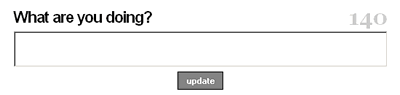
- From your Twitter page: S imply enter a message in the text field at the top of the page and click "Update."
- From your mobile phone: Send an SMS message to 40404.
- From your IM account: Send a message to either twitter@twitter.com (Jabber/GTalk) or TwitterIM (AOL).
Your tweet will be displayed to your followers, either on their Twitter page, mobile phone, or any other way they are setup to receive Twitter updates.
Following Other Twitter Users
Finding and adding friends to your "Twitterverse" is easy.

- From the Twitter website: Login to your account, visit your friends' Twitter pages and click "Follow" underneath their photo. If your friend's account is public, you will immediately start seeing their tweets on your page, otherwise your friend will need to approve you before you can see their updates.
- From your mobile phone or IM account: Send the command follow username.
See the Twitter website for a complete reference of Twitter Commands.
@Replies and Direct Messages
When you send a message with @username at the beginning, it's understood that your message is intended for that specific user, but all your followers can still see the tweet. Note that for the intended recipient to see your message on their home page, they must be following you, otherwise they will only see your message on the Replies tab.
To send a friend a private tweet, use the Direct command: d username message.
Learn more about using Twitter:
How to Network with Twitter
The following blog posts are aimed at bloggers and other professionals who would like to use Twitter for business.
- How to Get More Twitter Followers
- 5 Tips to Grow Your Twitter Presence
- Building Your Twitter Presence Part 2 - Pre-Prepared Tweets
- Building Your Twitter Presence Part 3 - TweetBaiting
- 8 Tips for Power Networking on Twitter
- 14 Ways To Get Unfollowed on Twitter
Twitter In The News
- Recap: The Folks At Twitter Have Been Busy This Week (04/13/10)
- Ruffalo Retrieves Wallet From Stranger Through Tweets
- Top NewsBlaze Twitter Followers in 2010 Helped Spread The Word
- Twitter Implicated in Break Up Between Aniston and Mayer (03/29/09)
- Buddhist Monks Say Twitter Can Lead to Happiness (03/12/10)
- Twitter's Tweet Smell Of Success (03/18/09)
- The Future, Growth and Monetization of Twitter (06/11/08)
- Twitter refuses to ban abusive users (05/22/08)
- Why Twitter Matters: Can the fledgling microblogging service become a social media powerhouse to rival giants like Facebook—or will it be gobbled up? (05/15/08)
- Twitter Emerges as Key Communications Channel in China Quake (05/13/08)
- Twitter Gaining Momentum But Still Niche (04/29/08)
Twitter Tools
 Subscribe
to the Twitter Tools RSS feed and get notified of the latest tools added
to tweeternet.
Subscribe
to the Twitter Tools RSS feed and get notified of the latest tools added
to tweeternet.
To suggest a tool, app or resource just add me to your del.icio.us network and share the link!
More Places to Find Twitter Tools
- The Ultimate Guide for Everything Twitter
- Twitter Apps
- Twitter Fan Wiki's Apps List
- Lee Odden's BIGLIST of Twitter Tools
- How We Tweet: The Definitive List of the Top Twitter Clients
- 25 Twitter Apps to Manage Multiple Accounts
The easiest way to educate your site visitors and clients about
Twitter?
Link to this page!
Tweet me with feedback and suggestions for improvement. I want tweeternet.com to be clear, concise, and accurate.
Follow Sam Stevens The original creator of Tweeternet
tweeternet.com is not affiliated with Twitter, LLC.
Thanks to GetXperts for their excel experts.
What Types of Twitter Content Are Most Appealing to Seniors?
Twitter’s become a hit with folks of all ages recently. What’s surprising is the growing number of seniors jumping on board. They’re exploring this social media hub, often from their assisted living homes, in search of content that aligns with their interests and lifestyle.
Twitter has proven to be an intriguing way for them to keep up-to-date, stay connected, and have some fun. We’re going to dive into what kind of stuff catches senior citizens’ attention most on Twitter – we’ve broken it down into four main areas.
Educational Content and News
Seniors are digging Twitter for its info-packed and enlightening posts. Tweets with health tips, wellness guides, or hobbies catch their eye. Stuff like article links, short how-to videos on gardening, or DIY projects are particularly popular.
Plus, who needs a newsstand when you’ve got Twitter? Current happenings worldwide get delivered straight to them in bite-sized tweets from trusty sources. Detailed articles are linked right there, too, which is just perfect for seniors’ continual learning and staying updated.
Community and Family Connections
Twitter’s ability to foster community connections is particularly valuable to seniors. They love tweets that keep them in the loop – family news, buddy updates, and stuff from their local groups. From cute grandkid pics to juicy neighborhood gossip, they’re all over it!
Seeing posts about what’s up at the nearby library or hobby club adds spice to their day. It keeps them posted on upcoming gatherings or online meetups, too. This makes Twitter an ideal place for staying connected and feeling part of something bigger.
Entertainment and Humor
Entertainment is a significant aspect of the content consumed by seniors on Twitter. Twitter has plenty of fun stuff they enjoy. From funny tweets to amusing anecdotes, it gives them their daily dose of laughter. They’re keen on comic strips and uplifting tales.
Who can resist those cheeky laughs or the warm stories? Plus, threads chatting about classic movies or old TV favorites sure take them down memory lane. This kind of fun not only adds sparkle to their day but boosts overall happiness, too.
Health and Wellness Tips
Finally, health and wellness are big on seniors’ Twitter radar. They’re all in for tweets dishing out healthy living tips or exercise moves suited to their age group. Nutritious recipes and stuff about handling common senior health concerns are so useful.
Mental well-being matters, too. They dig posts chatting up mindfulness or cutting down stress levels. This kind of content makes them feel like the boss of their own well-being, helping them live life full tilt.
Conclusion
Seeing seniors loving Twitter shows how well they’re blending with the digital age. From learning bits and community updates to fun stuff and health chats, there’s something for every silver surfer. It tells us about their knack for modern tech but also highlights Twitter’s role as a go-to hub of useful and enjoyable content.
For our older pals in places like assisted living homes, it goes beyond just being social media. Think of it more like an open window connecting them to a big world out there that keeps them clued in, engaged, and mentally vibrant.
4 Ways Seniors Can Harness Social Media for Improved Mental Health
These days, social media isn’t just for chatting with friends and family. It’s a treasure trove of learning, engaging, and connecting possibilities.
For our older folk in senior living homes especially, it can be an uplifting experience that helps to enhance their mental health situation immensely.
So let’s dive deeper into four creative ways seniors could make use of social media platforms not only as entertainment but also as tools for looking after their mental well-being.
Building and Maintaining Social Connections
Social media, think Facebook or Twitter, are more than just apps for seniors. They’re a lifeline to the world outside! Loneliness can hit hard in old age and might pull them down into depression. But thanks to social networks like these, they find ways around those sad feelings.
No need to worry about distance with Instagram at their fingertips. It brings friends and family that much closer. Being active on these platforms helps keep our older folks socially alive no matter what life throws at them.
It’s not all about chats, either. Photos get shared, keeping memories fresh as springtime daisies! And let’s not forget joining groups of people who love the same things – from garden fans swapping tips online or armchair detectives unraveling TV mysteries together!
Engaging in Lifelong Learning
The internet is like a giant knowledge chest, and social media’s the key. Seniors can follow hobby-based groups or pages on topics they love, such as current events or history.
YouTube has tutorials galore, from art to knitting, historical insights to travel diaries. Engaging in these activities sharpens their minds and builds new skills while also boosting feelings of achievement, all great stuff for mental health.
Participating in Virtual Events and Activities
Online gatherings like book clubs, workouts, or concerts are gaining popularity on platforms such as Facebook and Zoom. They’re more than just fun, they also allow seniors to join in group activities from home.
This kind of involvement lifts their spirits, adds routine to their day, and makes them feel part of a community. Seniors can groove at virtual dance parties or even drop into worldwide prayer sessions, and there’s no limit!
Accessing Mental Health Resources
Lots of groups and pros share mental health info on social media. They give advice, articles, and resources to help out. By becoming a follower or joining these spaces, seniors can tap into rich info sources for their own mental well-being challenges.
It’s easy to find ways to relax online, as well as signs you may have depression or anxiety issues. Plus, they could link up with pro helpers, not forgetting support groups ready with some wise words!
Conclusion
If seniors use social media in a productive way, it can be great for their mental health. Yes, they need to stay safe online and avoid getting too sucked into the digital realm. But when used right, these platforms offer lots of benefits, like keeping up with family photos or finding old friends.
It’s all about striking that balance, using social media not just as entertainment but also as a route to connect in meaningful ways, perhaps by joining groups of interest or learning something new every day alongside staying socially active.
3 Ways You Can Use Twitter To Improve Your Life
Using Twitter to improve your life may seem crazy, but it’s definitely a possibility. If you’re new to the world of the internet, trying to learn more about how you can use different websites, or you’ve recently reached retirement and are simply looking for a place online to help pass the time – Twitter can be a great place to check out.
With its rising popularity, this is a website that most people frequent, and those that don’t have at least heard of it. Here are 3 ways you might be able to use Twitter to help improve your life.
Promote Your Brand
Twitter et is the perfect place to promote your business, your brand, yourself, or anything else.
You can start conversations and promote things that are important to you. Whether you’re an author, a comedian, a scientist, or any number of other things – Twitter may be just the place to express your thoughts, debate with others, or meet like-minded folks. By posting relevant and useful information on your feed people will turn to your account as a credible resource.
From your own original content to reposting others’ it’s the perfect place to build your brand and get more followers. Make sure that you have your Twitter page branded with your company logo and a headline that clearly displays who you are and what you stand for. That way, there will be no question about who the account belongs to.
Stay Up to Date
Twitter is more than just a social media platform— it’s microblogging in real-time. Never before have we been able to stay up to date with what’s going on across the world at such an instant and rapid rate. If you’re someone who likes to stay informed, then Twitter is the most reliable real-time source for newsworthy headlines.
Keep In Touch
Keeping in touch with people you care about or those you’ve met randomly throughout the years isn’t always easy, but with websites like Twitter, it’s definitely made easier. You can reach out to people with small snippets or choose to start longer conversations or tell stories you think they might like to hear. It’s a simple way to talk to people you may not otherwise! You might also get to meet new people in the Twittersphere, and that’s always fun too.
Discover Different Views
If you stay off the internet and only come into contact with family and friends, you are most likely only getting one set of viewpoints and your worldview is going to be limited and skewed because of this.
It can be interesting and enlightening to talk to people who have different opinions than you do because it’ll allow you to learn new things and even consider changing your mind on certain topics that you may not have been very informed about. If this sounds enticing to you, make a Twitter account and start some conversations to see where it gets you!
Twitter is not only a lot of fun but it can also help make your life a little bit better in so many different ways! Hopefully this list can help with that.
4 Tips For Getting More Followers On Twitter
While some people may consider the number of followers that you have on social media to be nothing more than vanity, the truth is that from a business standpoint, it’s so much more than that. The more followers you have, the more social influence you have, and the more credible your business appears.
Statistics show that over 50% of consumers have a Twitter account. Needless to say, the more you can appeal to this kind of large audience, the more your business will thrive. While there are quick fixes like buying followers, organic followers are truly the best way to go.
So, how do you go about attracting as many followers as possible? Here are some of the best tips to get started.
Use Hashtags
There are people out there looking for all sorts of information on Twitter, and the way that they find it is through hashtags. Whether they’re looking for ways to run a more efficient warehouse, or tips on how to bake the perfect chocolate chip cookies, there’s a hashtag that goes with it.
Any time you post something, post a few relevant hashtags that go along with it. These serve as breadcrumbs for people to find your content on your Twitter. From literal hashtags, to your own personal hashtags that catalog your unique identity, to piggybacking on popular hashtags like #MondayMotivation, there are all sorts of ways to make use of hashtags to increase your visibility.
Tweet Often
Since you can think of Twitter as microblogging, the same rules apply to a regular blog as they do to Twitter. The more often you tweet, the more likely you are to attract an audience. Since tweets are so short, it’s perfectly acceptable to tweet several times a day, as long as it’s relevant and informative.
You can tweet on newsworthy topics and reply and retweet to integrate yourself into the Twitter global conversation. The more that your name shows up, the more likely you are to be seen as a credible resource on newsworthy topics.
Personalize Your Page
It’s important that when people land on your page they know exactly where they are and who you are. Make sure that your profile photo clearly displays your logo or photo, as well as your banner image.
Anyone who lands on your Twitter should know immediately within the first several seconds what your personality is. Whether it’s humorous or strictly business, let it shine on your page in a straightforward way.
Time Your Content
Nowadays, there are all sorts of applications that can help you time your tweets so that they go out at just the right moment. These applications can help you track the most active times on Twitter and when a tweet would be likely to garner the most engagement.
By timing your tweets down to a science, you’ll maximize your Twitter performance, and increase your chances of your tweets going viral. Some of these applications are paid, while others are free. They are incredibly easy to use and can help you plan out your content schedule and measure your tweets’ engagements, making changes where necessary.
3 Tips For Making Your Writing More Concise
When writing for an online audience, be it on Twitter or other social platforms, one thing you should be aiming for with your content is brevity. The more concise you can be with the content you’re creating, the easier it will be for people to read, interact with, and remember. However, writing in a concise manner is something that many people struggle with, especially if you feel like you are always trying to sell all of the benefits of something in order to close a sale.
Luckily, there are a few tricks that you can try to help make your writing more on the brief yet impactful side. To help you see how this can be done, here are three tips for making your writing more concise.
Write In A Straightforward Fashion
One thing that can make all writing longer and more meandering is when you’re not straightforward. If you’re trying to hide something or convince people of a specific point, you’ll often find that you add more and more words to help you do this. But if you’re wanting to be concise, what you should really be focusing on is the most important words or facts that will create the greatest impact for your reader.
Especially when it comes to things like Twitter or other short-form content, what you want to do is give your audience enough so that they are interested in going to your website or other content that can expound more on a concept. But for the sake of being concise, you’ll want to be as straightforward as possible.
Switch Out Phrase For Words
Something else that can make your content more rambling is when you take the long way to get to a point that could have been made in fewer words.
To see if this is something that you can improve upon in your writing, try to uncover where you’re using phrases that could easily be switched out for just a word. For example, rather than saying that someone “gave an assessment” of something, you can say that they “assessed” something. This can help to cut down on a lot of bloat in the content you write.
Edit Like A Journalist
Professional writers have to do a lot of editing. Especially if they are a journalist, their writing needs to be formatted in such a way that the most important content is shared first and given priority. Then, as the piece goes on, the less important details can be added. So if you’re wanting to make your writing more concise, think about yourself as if you were a journalist needing to give the most important information first and removing any words or phrases that don’t immediately add to what you’re trying to create.
If you’re looking to make your writing more concise, consider using the tips mentioned above to help you see how this can be done.